Skypilot: A Font That Brings Street Art to Your Design Projects
There's something undeniably magnetic about street graffiti. The raw energy, the bold lines, the way it commands attention on a city wall—it's art that refuses to be ignored. But translating that authentic urban aesthetic into professional design work has always been tricky. Most "graffiti-style" fonts look cartoonish or overly polished, stripping away the very thing that makes street art compelling. Skypilot changes that conversation entirely.
Crafted with Authenticity in Mind
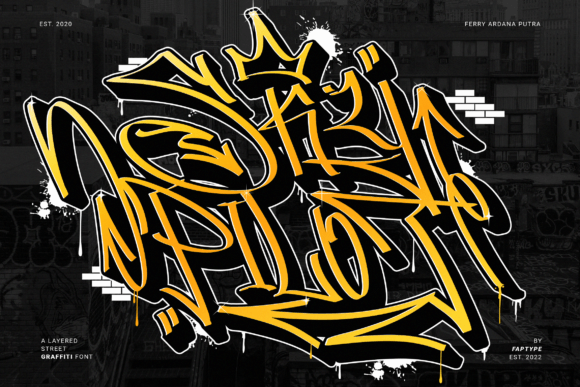
What sets this typeface apart is its origin story. Each letter was carefully selected from hundreds of variations, drawn with a flat pen to capture the natural pressure and angle shifts that real graffiti artists use. The result isn't a computer-generated approximation—it's a font that genuinely feels like it was pulled straight off a brick wall downtown. The strokes have that imperfect, hand-rendered quality that designers spend hours trying to fake with other tools.
The lowercase and uppercase characters carry slightly different energies, which gives you flexibility when crafting headlines or display text. Some letters lean into aggressive angles while others settle into a confident rhythm. That variation is intentional—it mirrors how real graffiti pieces flow across surfaces, adapting to the space and the artist's mood in the moment.
Why the Extruded Version Changes Everything
Here's where things get genuinely interesting for anyone working on visual projects. Skypilot ships with a complimentary extruded version, and pairing the two together opens up a layered design approach that's surprisingly effective. Think about those massive murals where letters seem to pop off the wall with dimension and shadow. That's exactly the effect you can achieve without spending hours in Illustrator manually creating depth.
Layer the base version over the extruded style, offset it slightly, and you've got instant dimension. Adjust the colors between layers—maybe a bright yellow base with a deep shadow—and suddenly your t-shirt design, poster, or social media graphic has that coveted street art energy without looking like a clip art collage. This pairing technique works beautifully for merchandise, video thumbnails, album covers, and event posters where you need maximum visual impact.
Real Applications for Real Projects
Let's talk about where this typeface actually earns its place in your design toolkit. If you're building a brand identity for something with attitude—a streetwear label, a skate shop, an urban music project, a craft brewery with personality—Skypilot gives you a visual language that communicates instantly. Your audience doesn't need to read the words to understand the vibe. The typography does that heavy lifting before they process a single letter.
For social media graphics, especially on platforms like Instagram and TikTok where you have roughly two seconds to stop someone from scrolling, bold display typography is your best friend. A headline set in Skypilot layered over a simple background photograph creates the kind of thumb-stopping content that actually gets engagement. It's not about being loud for the sake of it—it's about having a visual voice that matches your message.
Packaging design is another space where this font shines unexpectedly. Imagine a hot sauce label, a craft coffee bag, or a limited-edition sneaker box. These products thrive on personality, and typography plays a massive role in whether someone reaches for your product or passes it by. Skypilot brings that handmade, rebellious quality that premium consumers associate with authenticity and small-batch craftsmanship.
The Practical Stuff You Need to Know
One of the most frustrating experiences with specialty fonts is discovering that half the characters you need are locked behind some complicated encoding system. Skypilot is PUA encoded, which means every glyph, swash, and ornament is accessible through standard character maps. No special software required beyond what you're already using. If you work in Adobe Creative Suite, Canva, or even basic design apps, you can pull up the full character set and start customizing immediately.
Speaking of those swashes and ornaments—they're genuinely useful, not just decorative afterthoughts. You can add flourishes to initial letters, extend tails on ending characters, or drop in ornamental elements between words. These extras let you fine-tune the personality of your typography without switching to a different typeface or manually drawing embellishments. For invitation designers, editorial layouts, and anyone creating digital products like printable wall art, these details matter enormously.
Pairing Skypilot with Other Typefaces
Every display font needs a partner for body text, and choosing that pairing wisely makes the difference between a polished design and a chaotic one. Because Skypilot carries so much visual weight and personality, you'll want to balance it with something quieter. A clean sans serif font works well for product descriptions, event details, or supporting copy. Think about fonts like Montserrat, Open Sans, or even a simple geometric typeface that steps back and lets the headline do the talking.
Avoid pairing it with other highly stylized fonts—script fonts, decorative serifs, or other display faces will compete for attention and create visual noise. The goal is contrast, not competition. Let Skypilot own the headlines and hero text while your secondary font handles the information your audience actually needs to read carefully.
Test your pairings at actual size before committing. A combination that looks balanced at 72 points on your monitor might feel completely different at 24 points on a mobile screen or printed at 11 points on a business card. This is especially true for a typeface with this much character—its strengths are amplified at larger sizes, but readability drops off quickly in smaller applications.
Licensing and Commercial Considerations
If you're planning to use this font for client work, merchandise you sell, or any commercial application, verify the licensing terms before you start designing. Most premium fonts come with clear commercial licenses, but the specifics vary—some cover unlimited projects, others limit the number of end products or require extended licenses for certain uses like app development or large-scale merchandise runs. Understanding these details upfront saves you from awkward conversations with clients or, worse, legal complications down the road.
For designers who work across multiple projects, investing in a well-crafted commercial font like this one often pays for itself quickly. The time you save not hand-drawing custom lettering for each project, combined with the consistency and quality a professional typeface provides, directly impacts your bottom line and your creative output.
Making It Work for Your Brand
The most important question isn't whether Skypilot is a good font—it clearly is. The question is whether it's the right font for your specific project and audience. If your brand identity leans toward the refined, minimal, and corporate, this probably isn't your match. But if your audience values authenticity, creativity, and a bit of edge, this typeface speaks their language fluently.
Start by applying it to one project—a social media campaign, a product label, an event poster—and see how your audience responds. Great typography doesn't just look good; it creates a feeling, tells a story, and builds the kind of visual recognition that turns casual viewers into loyal fans. That's the real power of choosing the right typeface for the job.